
NutriScan icon

NutriScan

Scan food labels with AI. Compare sugar, saturated fat and salt at a glance.

Lee etiquetas con IA. Compara azúcar, grasas saturadas y sal con un semáforo.

NutriScan screenshot 1NutriScan screenshot 2NutriScan screenshot 3

English

NutriScan: Food Label Scanner

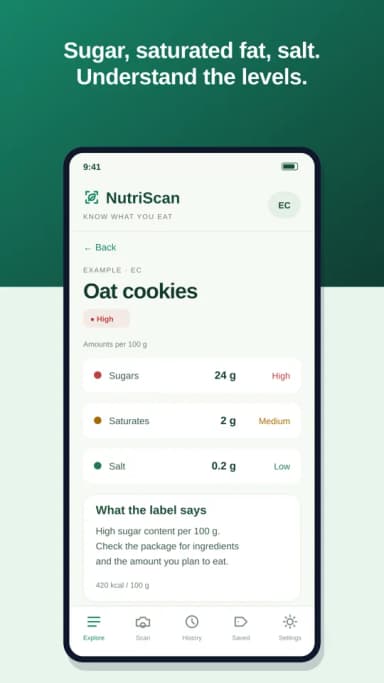
Understand the label before choosing a food. NutriScan helps you read ingredients and nutrition information with AI, and shows sugar, saturated fat and salt using a simple traffic light.

SCAN AND CHECK

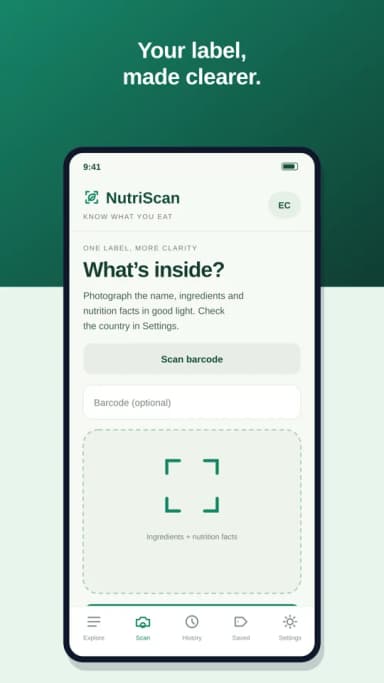
Scan a barcode to look for a product already in the catalogue. If it is new, photograph the name, ingredients and nutrition table, or choose a photo from your gallery. AI reads the label and prepares a short explanation. Check the result against the package before confirming and saving it.

NUTRIENTS AT A GLANCE

See low, medium or high levels of sugar, saturated fat and salt, with amounts per 100 g or 100 ml. Missing information is shown in grey. The comparison uses concentration thresholds from the UK front-of-pack guide; it is not a local food certification or an overall health score.

YOUR PRODUCTS, YOUR COUNTRY

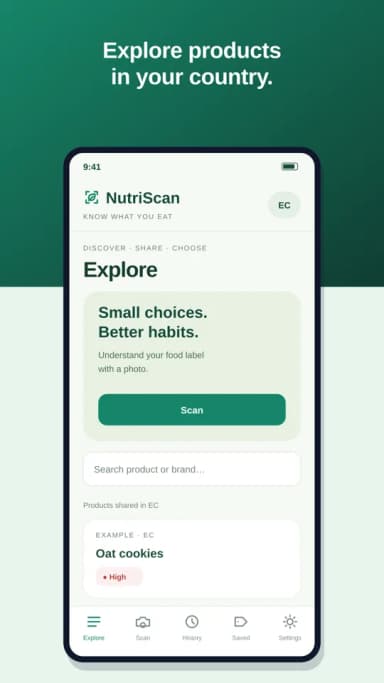
Browse products shared in the selected country, search by name or brand, and return to your scan history and favourites. The country is initially suggested from your device settings and can be changed.

ENGLISH AND SPANISH

The interface follows a supported device language and can be changed in Settings. Sign in with email or Google to access your saved products.

AI AND YOUR PHOTOS

Label analysis uses OpenAI and requires an internet connection. Before analysis, the app explains that the selected photo will be sent for processing. Avoid including people or personal information in the image. Daily analysis limits may apply.

NutriScan provides general nutrition information, not medical advice, diagnosis or treatment. AI readings can contain errors. Always check the original package, especially allergen information. A colour does not measure toxicity or guarantee that a food is suitable for you.

Español

NutriScan: Escanea alimentos

Entiende la etiqueta antes de elegir un alimento. NutriScan te ayuda a leer ingredientes e información nutricional con IA y muestra azúcar, grasas saturadas y sal mediante un semáforo sencillo.

ESCANEA Y COMPRUEBA

Escanea un código de barras para buscar un producto que ya está en el catálogo. Si es nuevo, fotografía el nombre, los ingredientes y la tabla nutricional, o elige una foto de la galería. La IA lee la etiqueta y prepara una breve explicación. Comprueba que coincida con el envase antes de confirmar y guardar.

NUTRIENTES A SIMPLE VISTA

Consulta niveles bajos, medios o altos de azúcar, grasas saturadas y sal, con cantidades por 100 g o 100 ml. La información incompleta se muestra en gris. La comparación usa umbrales por concentración de la guía británica de etiquetado frontal; no es una certificación alimentaria local ni una puntuación global de salud.

TUS PRODUCTOS, TU PAÍS

Explora productos compartidos en el país seleccionado, busca por nombre o marca y vuelve a tu historial y favoritos. El país se propone inicialmente a partir de los ajustes del dispositivo y puedes cambiarlo.

ESPAÑOL E INGLÉS

La interfaz sigue un idioma compatible del dispositivo y puedes cambiarlo en Ajustes. Inicia sesión con correo o Google para acceder a tus productos guardados.

IA Y TUS FOTOS

El análisis de etiquetas usa OpenAI y requiere conexión a internet. Antes de analizar, la app explica que la foto seleccionada se enviará para procesarla. Evita incluir personas o datos personales en la imagen. Pueden aplicarse límites diarios de análisis.

NutriScan ofrece información nutricional general, no asesoramiento médico, diagnóstico ni tratamiento. La lectura con IA puede contener errores. Verifica siempre el envase original, especialmente los alérgenos. Un color no mide toxicidad ni garantiza que un alimento sea adecuado para ti.

NutriScan is developed by INFRANOVASOFT Technology Solutions. Contact: desarrollo@infranovasoft.com